The Blog
Recordful Motion 2: Charts, Diagrams, Text Behind You and Background Removal With No Green Screen
Ask the Recordful Agent for a chart, a flowchart or a title behind your head and it builds one, timed to your words. Remove, blur or replace your camera background with no green screen, on your own computer and free on every plan.
Launch ·
Recordful 4.9: Edit by Transcript, Voice EQ, Shapes, Markers and No More Lost Recordings
Recordful 4.9 is the biggest update yet: cut a video by deleting its words, tune your voice with an EQ, draw arrows and numbered steps, mark moments while you record, and get your recording back after a crash. Plus calls to action, viewer invites, a Loom importer and a hosted MCP connector.
Launch ·
Recordful vs Cap (2026): Free Plan, Pricing and Editor Compared
Recordful vs Cap compared: free for work vs personal use only, one Pro price per workspace vs per user, an editor that runs in the browser and on Chromebook.
Comparison ·
Screen Studio Alternative for Chromebook (Free Auto-Zoom, 2026)
Screen Studio is Mac only. Make Screen Studio-style recordings with auto-zoom on clicks on a Chromebook, or in any Chrome browser, with Recordful's free extension.
Comparison ·
Free Snagit Alternative (2026): Full-Page Screenshots and Screen Recording, No Subscription
Snagit is now subscription-only at $39 a year. Recordful takes full-page scrolling screenshots in Chrome, edits them and records your screen for free, with Snagit's terms from TechSmith's own pages in November 2026.
Comparison ·
Cap Alternative as a Chrome Extension With a Full Editor
Cap's Chrome extension records and uploads to your Cap library; its editor lives in the desktop app. Recordful edits in the browser, free, with 4K export.
Comparison ·
CleanShot X Alternative for Windows (2026): Free Screenshots on Any Computer
CleanShot X is Mac only and costs $35 plus $19 a year for updates. Recordful takes and edits screenshots for free on Windows, Linux, ChromeOS and Mac, with prices from CleanShot's own pricing page in November 2026.
Comparison ·
Introducing Recordful Motion: Titles, Lower Thirds and Callouts for Screen Recordings
Recordful Motion adds animated lower thirds, titles and callouts to screen recordings, drawn on your computer with no render step. The Agent places them from what you say. Plus blur and spotlight masks, in the web editor and desktop app 2.2.
Launch ·
How to Add a Voiceover to a Screen Recording After Recording
Record narration over a finished screen recording without recording the screen again. Start at the playhead, talk while the video plays muted, and the take lands on the timeline.
Guide ·
How to Make Claude Code, Cursor, or Codex Record a Browser Demo
Connect Recordful's MCP server to Claude Code, Cursor or Codex, hand it a Chrome tab, and your AI records the demo while it clicks and types. 8 steps, with screenshots.
Guide ·
AI Screen Recording Editor: Edit a Video by Telling It What to Change
Edit a screen recording by chatting with an AI agent. Cut filler words and pauses, add captions, zooms and a 9:16 frame in plain words, then undo anything with Ctrl+Z.
Guide ·
How to Combine Multiple Screen Recordings Into One Video (Free)
Merge screen recordings, video files and pictures into one video in your browser, drag the clips into order and export one MP4. Free, no account, no upload.
Guide ·
Free Loom Alternative With No 5-Minute Limit (2026)
Loom's free plan stops at 5 minutes and 25 videos. Recordful records and exports with no time limit, no video cap and no account, and adds share links for $9 a month for your whole workspace.
Comparison ·
Recordful vs Screen Studio (2026): Price, Platforms and Free Plan
Recordful vs Screen Studio compared on price, free plan, platforms, auto-zoom, editing, share links and team pricing, with facts from screen.studio in November 2026.
Comparison ·
How to Remove Filler Words, Long Pauses and Background Noise From a Screen Recording
Cut every um and uh, shorten dead air, and clean up noise, echo, mouth sounds and breaths in a screen recording with a few switches. Before and after video included.
Guide ·
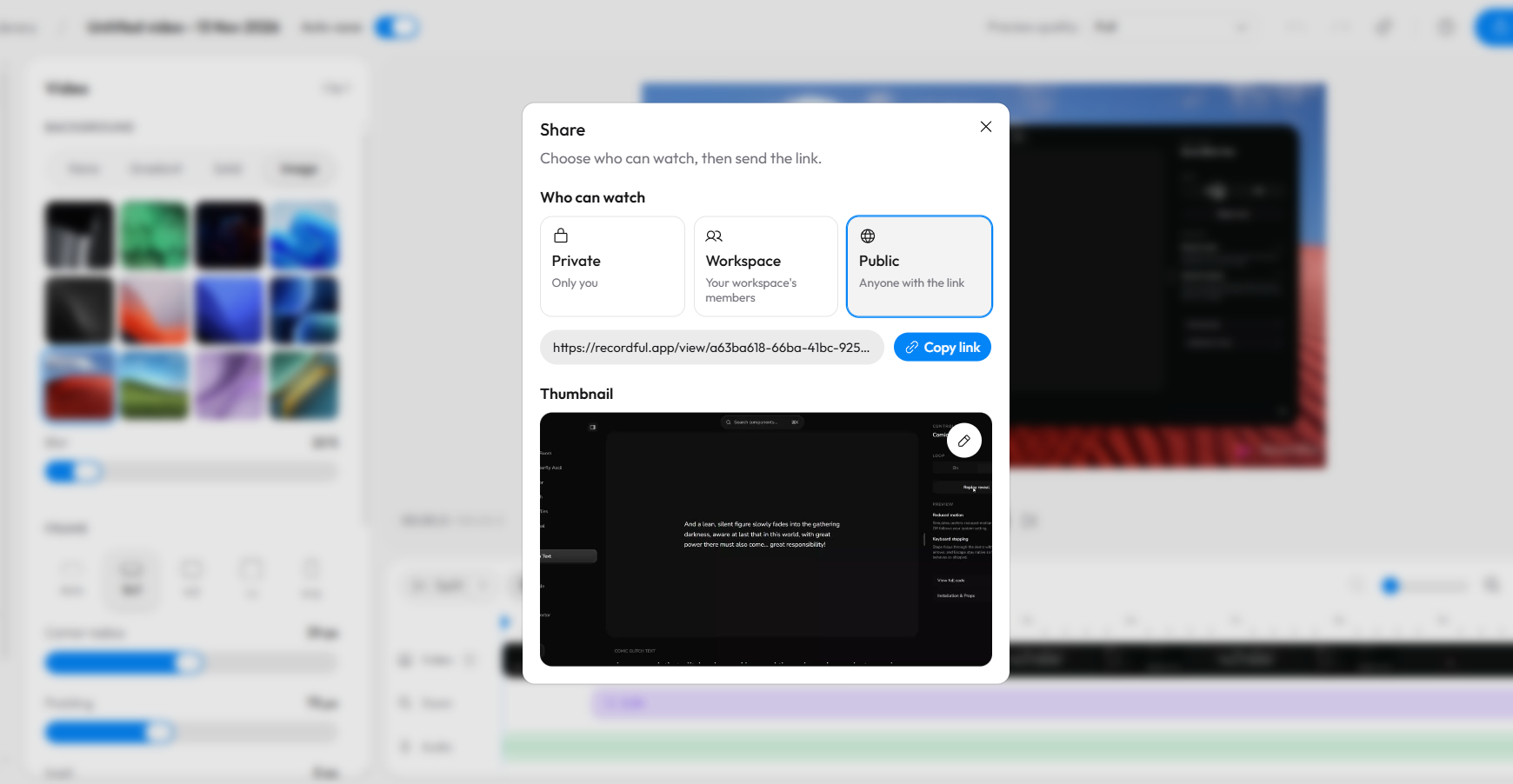
How to Share a Screen Recording Instantly With a Link
Record your screen and have a share link on your clipboard the moment you stop, with no upload step. Viewers watch in the browser with a transcript, captions and comments.
Guide ·
How to Add Your Logo as a Watermark to a Screen Recording (Free)
Put your company logo, your name or both on every screen recording you export. Set the size and opacity, or turn the watermark off. Free, in the browser or the desktop app.
Guide ·
Free Loom Alternative With 4K Export (2026)
Loom's free plan records up to 720p and 4K needs a paid Business plan. Recordful exports MP4 or WebM up to 4K for free, on your computer, with auto-zoom.
Comparison ·
Zight Alternative (2026): Free Plan Limits, Pricing per User, and a Free Option
Zight (formerly CloudApp) caps free recordings at 5 minutes, 720p and your last 50 captures, and charges per user. See the 2026 limits and prices, and a free recorder with no time limit.
Comparison ·
Loom Alternative With No Sign-Up or Account (2026)
Loom asks you to sign up before you record. Recordful records, edits and exports screen videos with no account, no email and no time limit, free in Chrome.
Comparison ·
Best Screen Studio Alternative for Windows (Free, 2026)
Screen Studio is Mac only. Recordful is a free screen recorder for Windows with auto zoom, smooth cursors, webcam overlays and a built-in editor.
Comparison ·
Loom AI Alternative: AI Summaries, Captions and Cleanup for One Price (2026)
Loom AI comes with Business + AI at $24 per user a month. Recordful Pro adds AI summaries, chapters, captions in 10 languages, filler-word removal and an editing agent for $19 a month per workspace.
Comparison ·
Best Screen Studio Alternative for Linux (Free, 2026)
Screen Studio does not run on Linux. Recordful is a free screen recorder for Linux with auto zoom, smooth cursors, webcam overlays and an editor.
Comparison ·
Cap Alternative for Teams: One Price for the Whole Workspace (2026)
Cap Pro costs $12 per user a month in 2026. See what teams of 3 to 25 pay, and Recordful Pro: $19 a month for the whole workspace, with folders, privacy and comments.
Comparison ·
Loom Alternative for Chromebook (Free, No Time Limit)
Loom's desktop app doesn't run on ChromeOS. Recordful records in Chrome on a Chromebook and edits in the browser: no time limit, 4K export, no account needed.
Comparison ·
Free Cap Alternative You Can Use for Work (2026)
Cap's free plan is for personal use only; work use needs a $29/yr license. Recordful is free for work: record, edit and export up to 4K with no account.
Comparison ·
Screenity Alternative with a Desktop App for Mac, Windows and Linux (2026)
Want a Screenity-style recorder outside the browser? Recordful has a free desktop app for macOS, Windows and Linux plus a Chrome extension, with auto-zoom, screenshots and an editor.
Comparison ·
Loom Alternative for Linux (Free, 2026)
Loom's desktop app is Mac and Windows only. Recordful has a free Linux app for Ubuntu, Fedora, Arch, Mint and Pop!_OS, plus a Chrome extension, with no time limit.
Comparison ·
Easy OBS Alternative for Screen Recording, With a Built-in Editor
OBS Studio is built for live streaming and scenes. If you just want to record your screen and polish it, here is a two-click recorder with auto-zoom, click effects and an editor built in.
Comparison ·
Open Source Loom Alternative (Free, 2026)
Recordful is a free, open source Loom alternative: a GPLv3 Chrome extension you can read and build, with no account, and recordings that stay on your computer.
Comparison ·
Vidyard Free Plan Limits in 2026, and a Free Alternative With Unlimited Recordings
Vidyard's free plan now allows 5 recorded videos a month, up to 30 minutes each. See the full limits and a free screen recorder with no video cap and no time limit.
Comparison ·
Tella Pricing 2026: Every Plan, Per User, and a Cheaper Option for Teams
Tella costs $26 to $39 per user a month in 2026, or $13 to $19 billed yearly, with no free plan. See what each plan unlocks, what teams of 3 to 25 pay, and a flat $19 workspace option.
Comparison ·
Free Camtasia Alternative: Camtasia Pricing in 2026 and a $0 Option
Camtasia is sold only as a yearly subscription in 2026, from $39 to $599 a year. Here is what each plan costs and a free recorder and editor with auto-zoom and 4K export.
Comparison ·
Loom Pricing 2026: What Teams Pay, and a Cheaper Option
Loom charges $18 to $24 per user a month in 2026 and has dropped its free Creator Lite seat. See what teams of 3 to 25 pay, and a flat $19 workspace option.
Comparison ·
Recordful vs Screenity (2026): Free Features, Pro Pricing and Desktop App
Recordful vs Screenity compared: what Screenity Pro charges for, what Recordful gives free, desktop apps, screenshots, AI agents and team pricing, with facts from Screenity's own site in November 2026.
Comparison ·
Recordful vs Loom (2026): Features, Pricing and Free Plan
Recordful vs Loom compared on free plan limits, team pricing, editing, export quality and platforms, with prices from Loom's own pricing page in November 2026.
Comparison ·
Recordful vs Tella (2026): Features, Pricing and Free Plan
Recordful vs Tella compared on free plan, trial, team pricing, 4K export, editing and platforms, with Tella's prices from its own pricing page and help center in November 2026.
Comparison ·
VEED Screen Recorder Free Plan Limits in 2026, and a Free Alternative
VEED's free plan adds a watermark, caps exports at 10 minutes and 720p. See its limits and per-user prices from VEED's own pages, and a free screen recorder with 4K export and no time limit.
Comparison ·
Free ScreenPal Alternative With No 15-Minute Limit (2026)
ScreenPal's free plan stops each recording at 15 minutes and leaves out system audio and auto captions. Here is ScreenPal's 2026 pricing and a free recorder with no time limit.
Comparison ·
How to Screen Record on a Chromebook (2026 Guide)
Two ways to screen record on a Chromebook: ChromeOS's built-in Screen capture (Shift + Ctrl + Show windows), and a free Chrome extension when you want to edit, zoom and export MP4.
Guide ·
Free Screen Recorder with Auto Zoom for Chrome (No Account Needed)
Looking for a free screen recorder with auto zoom? Compare Chrome extensions and desktop apps, and learn how to record smooth zoom without an account.
Guide ·
Free Screen Studio Alternative: Open Source vs Browser Based (2026)
Is Screen Studio free? No. Compare free and open source Screen Studio alternatives with browser based options, and see what you give up with each.
Comparison ·
How to Record a Product Demo Video in Chrome: 7 Steps (Free Tools)
Learn how to record a product demo video in Chrome in 7 steps: plan, script, record, zoom, edit and export. Includes length tips and a script template.
Guide ·
How to Make Screen Recordings Look Professional: 10 Simple Fixes (2026)
Make screen recordings look professional with 10 simple fixes: clean desktop, smooth cursor, zoom, trimming, clear audio and export. Free tools included.
Guide ·
Screen Studio Alternative for Windows: 6 Free and Cheap Options (2026)
Screen Studio has no Windows version. Compare 6 Screen Studio alternatives that run on Windows, including free open source apps and a Chrome extension.
Comparison ·
Clipchamp Screen Recorder Limits in 2026, and an Alternative With No Time Limit
Clipchamp stops screen recordings at 30 minutes and exports 1080p on the free plan. See its limits, from Microsoft's own pages, and a free screen recorder with no time limit and 4K export.
Comparison ·
Recordful vs Screencastify (2026): Free Plan Limits and Pricing
Recordful vs Screencastify compared on free plan limits, per-user pricing, export quality and editing, with numbers from Screencastify's own pricing page in October 2026.
Comparison ·
Descript Alternative for Screen Recording (2026): No Media Minutes
Use Descript mostly to record and polish screen recordings? Compare its media-minute and AI-credit limits with a free recorder and editor that has no meter, using Descript's own pricing page.
Comparison ·















Ready when you are. Hit record.
Record in the browser for free, or put the whole studio on your desktop. No account needed to start.
Free forever · No sign-up to record · Open source