By Kislay, creator of Recordful. Last updated November 15, 2026.
Short answer: Snagit no longer sells a one-time license. Since January 2025 TechSmith sells it only as a yearly subscription, listed at $39 per user per year. Recordful is a free alternative in Chrome: it takes full-page scrolling screenshots, area, visible-page and whole-screen shots, edits them with backgrounds, arrows, text, blur and one-click redaction, and records your screen with no time limit. No account, no subscription.
Is Snagit still a one-time purchase?
No. From TechSmith's support article "Is This a One-Time Fee?" on November 15, 2026: "TechSmith transitioned to an annual subscription-only model, beginning with Snagit 2025 and Camtasia 2025 in January 2025."
TechSmith's article on the move to subscriptions adds that customers keep access to perpetual versions they already bought, but "will not be able to purchase a perpetual upgrade license to access 2025 versions." If you cancel the subscription, you keep Snagit until the paid year ends.
How much does Snagit cost in 2026?
From TechSmith's Snagit store and pricing pages on November 15, 2026:
| Snagit | |
|---|---|
| Snagit Individual | $39 per user per year, billed yearly |
| Students | $20 a year (TechSmith calls it "a value of $39 USD") |
| Free plan | None |
| Refunds | 14-day money-back guarantee |
| License | "Personal subscriptions are non-transferable" |
| Platforms | macOS 14+, Windows 10 and 11 |
TechSmith shows prices in your local currency, so the figure you see may differ outside the US.
Recordful's screenshots and recordings are free:
| Snagit Individual | Recordful Free | |
|---|---|---|
| Price | $39 a year, every year | $0 |
| Account needed | Yes ("No keys needed, just sign in") | No |
| Linux | No | Yes |
| ChromeOS | No | Yes, in Chrome |
How do I take a free full-page screenshot in Chrome?
- Install Recordful from the Chrome Web Store. It also works in Edge and Brave.
- Open the page you want and click the Recordful icon.
- Open the Screenshot tab and choose Full page.
- Recordful scrolls the page and stitches it into one picture, then opens it in the editor.
You can set your own keyboard shortcut for each capture mode in Chrome's extension shortcuts.
Why do full-page screenshots break, and how does Recordful handle it?
Long screenshots usually go wrong in three places. Recordful handles each one:
- Sticky headers repeat. A fixed header or cookie banner can show up again on every screen of the picture. Recordful shows it once, at the top.
- Images are missing. Pictures that load as you scroll come out blank. Recordful loads them first.
- Chat boxes float in the middle. A chat's message box stays at the bottom, where it belongs.
The rest of the page's text is kept too, so you can copy the words out of the screenshot exactly as written.
What else can Recordful capture?
The Screenshot tab has four modes:
- Selected area: drag a box, or click an element to take just that element
- Visible part: what's on screen now
- Full page: the whole page, scrolled and stitched
- Entire screen or window: anything on your computer, not just the tab
The desktop app for Windows, macOS and Linux adds a shortcut that works from anywhere: Ctrl+Alt+S (⌘⌥S on Mac). The screen freezes first, so open menus stay in the shot. Click a window, click the desktop for the whole screen, or drag an area. Each one is saved as a PNG in Pictures/Recordful.
What does the free screenshot editor include?
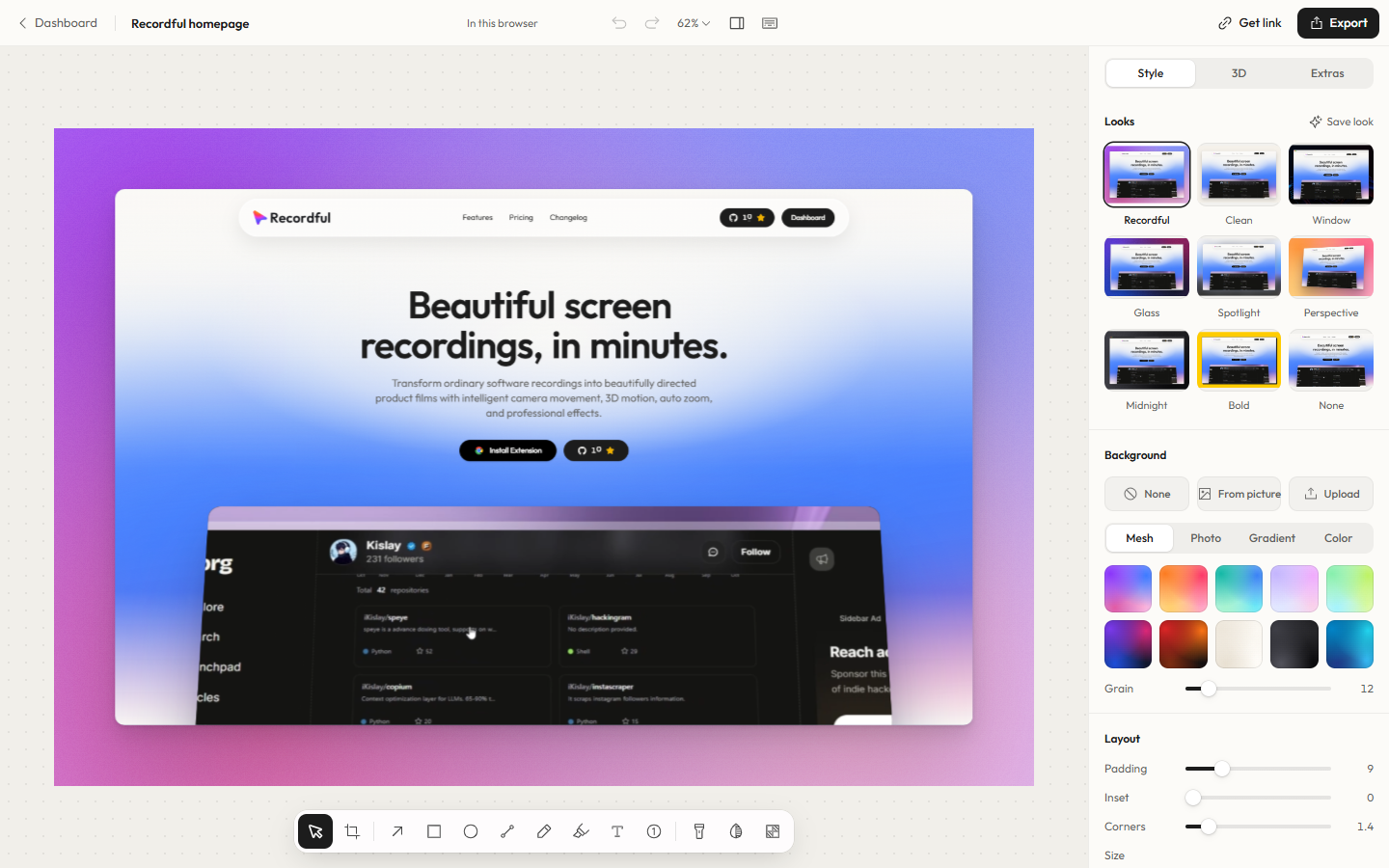
- Backgrounds: a new screenshot starts on a wallpaper picked to match its colours. Or pick a mesh, photo, gradient, colour or your own picture.
- Frames: padding, rounded corners, window frames, shadows, borders, and sizes for X, Instagram, LinkedIn and stories
- 3D tilt: tilt, turn and skew the picture, or pick a ready-made angle
- Markup: arrows that bend, rectangles, ellipses, lines, a pen, a highlighter, text, numbered steps, a spotlight, blur and pixelate
- Crop, rotate and flip, with undo through all of it
- One-click redaction: on a page captured with the extension, Recordful finds emails, phone numbers, card numbers, keys and tokens and hides them all at once
- Export: copy it, or download PNG, JPEG or WebP at 0.5× to 3×, or open a post on X or Threads with the picture ready
Can Recordful record my screen like Snagit?
Yes, for free. Record a tab, an area, a window, the whole screen or your camera, with no time limit and no cap on how many videos you make. The free editor has trim, cut, speed, auto-zoom on clicks, click effects and sounds, backgrounds, camera layouts, added clips and voiceover, and Recordful Motion for animated titles, callouts and blur masks. Export MP4, WebM or GIF up to 4K.
A Recordful mark is on new videos by default; you can turn it off, or use your own logo, for free. More in Recordful Screen Recorder and how to make a screen recording look professional.
How do I share screenshots and recordings with a link?
With Recordful Pro: $19 a month or $108 a year ($9 a month) for the whole workspace, with a 14-day free trial. Screenshots go into a Screenshots folder on recordful.app, private until you share a link, and each one gets comments and likes. Recordings get a watch page with a searchable transcript, captions, comments, an AI summary and chapters, and view analytics. You get 50 GB of storage, and you can invite your team at no extra cost per person. See how to share a screen recording with a link.
How to switch from Snagit to Recordful
- Install Recordful from the Chrome Web Store, or download the desktop app.
- For a web page, click the Recordful icon, open Screenshot and pick Full page, Selected area or Visible part.
- For anything else on your computer, pick Entire screen or window, or press Ctrl+Alt+S in the desktop app.
- Mark it up in the editor and hide private details with one click.
- Copy it or download it. Your Snagit subscription can lapse at the end of its year.
- To record a video instead, open the recording tab and press record. There's no time limit.
Frequently asked questions
Is there a free alternative to Snagit? Yes. Recordful takes full-page, area, visible-page and whole-screen screenshots, edits them and records your screen for free in Chrome, Edge and Brave, and in a desktop app for Windows, macOS and Linux. The Chrome extension needs no account.
Can I still buy Snagit with a one-time payment? No. TechSmith moved Snagit to an annual subscription-only model starting with Snagit 2025 in January 2025. Perpetual versions you already own keep working.
How much is Snagit per year? TechSmith lists Snagit Individual at $39 per user per year, billed yearly. Students can get it for $20 a year.
How do I take a full-page screenshot in Chrome for free? Install Recordful, click its icon, open the Screenshot tab and choose Full page. It scrolls the page, stitches it into one picture and opens it in the editor.
Does Recordful's full-page screenshot repeat sticky headers? No. Fixed and sticky bars like headers and cookie banners show once, at the top of the picture.
Do Recordful screenshots have a watermark? No. A screenshot only carries a watermark if you add one in the editor.
Does Recordful work on Linux and Chromebooks? Yes. The Chrome extension runs on Linux and ChromeOS, and the desktop app ships as a Linux AppImage. Snagit's pricing page lists macOS 14+ and Windows 10 and 11.
See Recordful Screenshot, the CleanShot X alternative for Windows and the Zight alternative for more.