

By Kislay, creator of Recordful. Last updated November 8, 2026.
Short answer: Screenity records from Chrome, through its extension or its web app. If you want the same kind of recorder as a real app on your computer, Recordful has a free desktop app for macOS 14+, Windows 10 and 11, and Linux (AppImage), plus an open-source Chrome extension that works like Screenity's. The desktop app records any display or window natively, captures system audio, and has its own editor with auto-zoom, a smooth cursor, a webcam bubble and styled backgrounds. Recording, editing and export are free; you only need a free account.
Does Screenity have a desktop app?
From Screenity's site and help center on November 8, 2026, Screenity is a Chrome extension and a web editor. You can record a tab, a window or your whole screen from the extension or from the editor's built-in recorder, and both run in your browser. Neither page lists a Mac, Windows or Linux app.
That works well when your work lives in Chrome. A desktop app helps when it doesn't:
- You record a native app, like Figma, Xcode, Excel or a terminal
- You want a screenshot shortcut that works without a browser open
- You want recording, editing and export on your computer, with no upload and no subscription
What is the best Screenity alternative with a desktop app?
Recordful. It comes in two forms, and you can use both:
| Recordful desktop app | Recordful Chrome extension | |
|---|---|---|
| Runs on | macOS 14+ (Apple silicon and Intel), Windows 10 and 11, Linux AppImage | Chrome 110+, Edge and Brave on Windows, macOS, ChromeOS and Linux |
| Records | Any display or app window, with mic and system audio | A tab, an area, a window, the full screen or camera only |
| Editor | Built into the app | Recordful's web editor |
| Screenshots | Ctrl+Alt+S (⌘⌥S on Mac) from anywhere | Area, visible page, full page or screen |
| Price | Free, with a free account | Free, no account needed |
The Chrome extension shares open-source roots with Screenity, so the recording toolbar, drawing and blur while you record will feel familiar. The desktop app adds native capture: ScreenCaptureKit on macOS and Windows Graphics Capture on Windows.
What can the Recordful desktop app do?
Record. Pick a whole display or one app window, then turn on your mic and system audio. When you stop, the recording opens in the editor.
Edit. The editor is built in and free:
- Auto-zoom that follows your clicks and cursor, plus manual zooms
- A smoothed cursor with size, motion blur and click bounce settings
- A webcam bubble you can move, resize, round and mirror
- Wallpapers, gradients, solid colours or your own image behind the recording, with padding, rounded corners and shadows
- Trims, speed-up and slow-down regions, crop, and text and image annotations
- Add clips and record a voiceover
- Recordful Motion titles, lower thirds and callouts, and blur and spotlight
- Save a project and come back to it later
Export. MP4 or GIF, with quality, frame rate and size settings, saved on your computer.
See the editor and how to make a screen recording look professional.
Can I take screenshots with the desktop app?
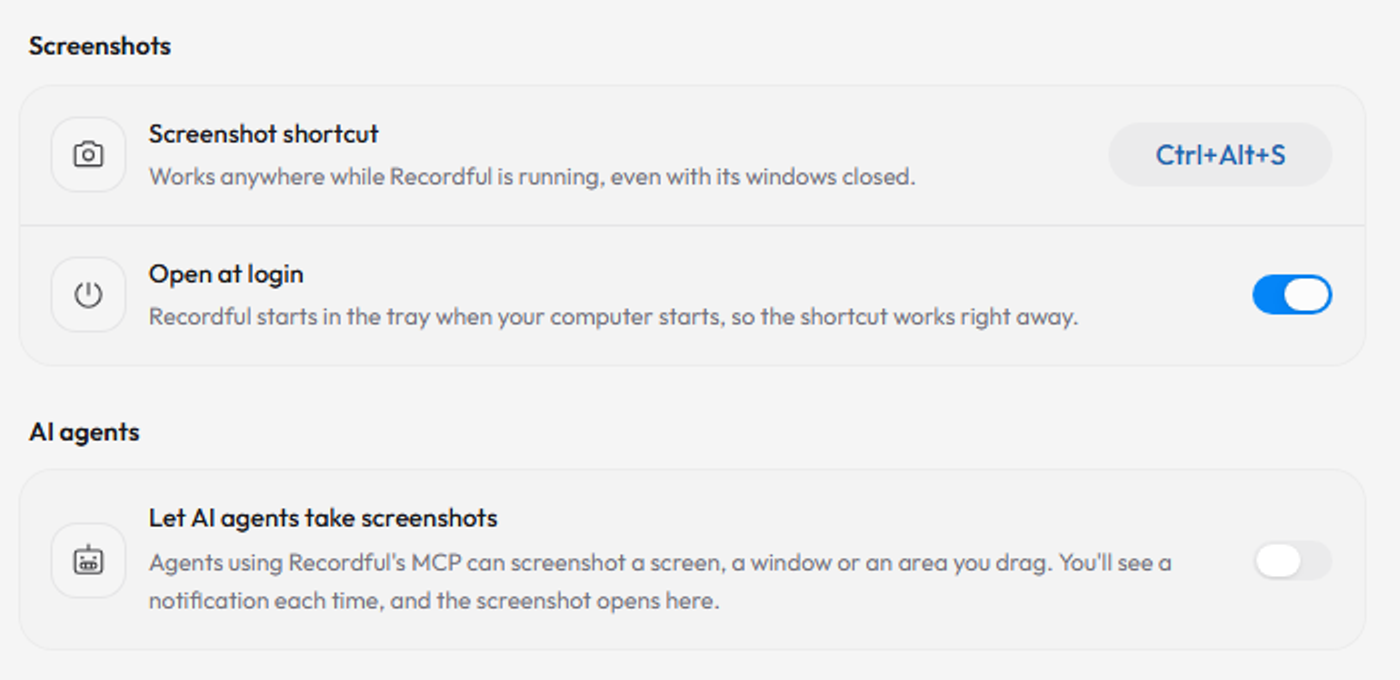
Yes. Press Ctrl+Alt+S (⌘⌥S on a Mac) from anywhere, or use the tray menu. Recordful waits in the tray (the menu bar on a Mac) and can open at login, so the shortcut works even with its windows closed.
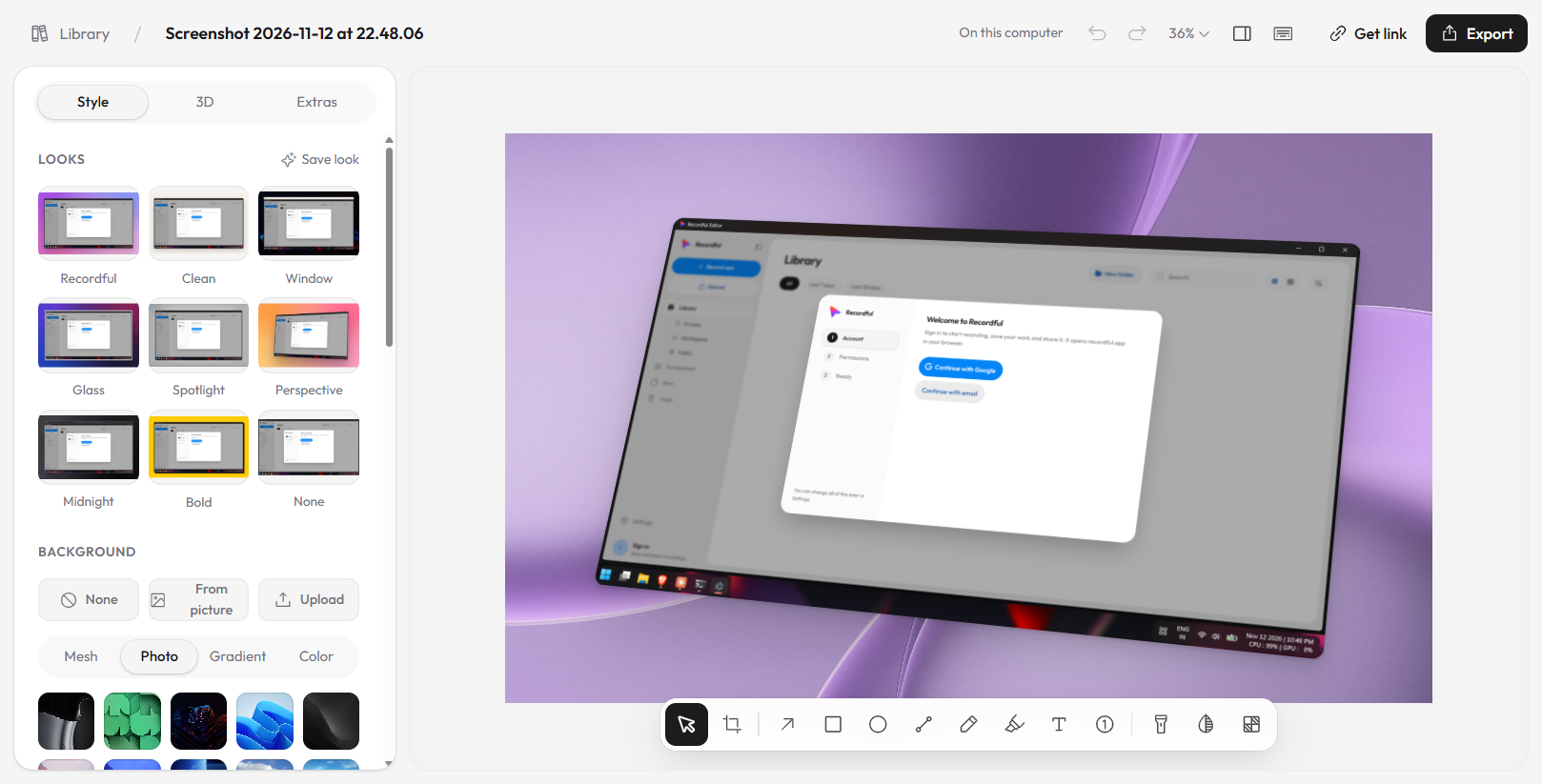
The screen freezes first, so open menus and hover states stay in the shot. Click a window, click the desktop for the whole screen, or drag an area. The picture is copied, saved as a PNG in Pictures/Recordful, and opens in the same screenshot editor as recordful.app: arrows, shapes, text, numbered steps, blur, spotlight, crop, a 3D tilt and a wallpaper picked to match its colours.
Can AI agents use the desktop app?
Yes. Turn on Settings → AI agents → "Let AI agents take screenshots", and agents that use Recordful's MCP server, such as Claude Code, Cursor or Codex, can screenshot a display, a window or an area you drag. You see a notification each time, and the screenshot opens in the app. With the Chrome extension, agents can also record browser demos for you. See Recordful Agents.
Is the Recordful desktop app free?
Yes. Download it, sign in with a free account, then record, edit and export with no time limit. Recordful Pro ($19 a month, or $108 a year for the whole workspace, with a 14-day free trial) adds cloud share links with a watch page, a transcript, captions in 10 languages, comments and view analytics, plus 50 GB of storage. Your team joins the same workspace at no extra cost per person.
For a feature-by-feature look at the extensions and plans, see Recordful vs Screenity.
How to switch from Screenity to the Recordful desktop app
- Go to recordful.app/download and pick your system: Apple silicon or Intel Mac, Windows, or Linux.
- Mac: drag Recordful into Applications. Windows: run the installer. Linux: make the AppImage executable with
chmod +xand run it. - Allow screen recording (and the mic, if you want it) when your system asks.
- Pick a display or a window and record.
- Stop. Polish the video in the editor: auto-zoom, background, webcam bubble.
- Export an MP4 or GIF. Keep the Chrome extension too for quick tab recordings.
Frequently asked questions
Is there a Screenity desktop app? From Screenity's site and help center on November 8, 2026, Screenity is a Chrome extension and a web editor, and no desktop app is listed. Recordful has a desktop app for macOS, Windows and Linux.
What is the best Screenity alternative for Mac? Recordful. Its desktop app runs on macOS 14 or later on Apple silicon and Intel, records any display or window with system audio, and edits with auto-zoom and styled backgrounds for free.
What is the best Screenity alternative for Windows? Recordful. The desktop app runs on Windows 10 and 11, and the Chrome extension runs in Chrome, Edge and Brave.
Is there a Screenity alternative for Linux? Yes. Recordful ships a Linux AppImage, and its Chrome extension runs on Linux too. See Loom alternative for Linux.
Is the Recordful desktop app free? Yes. Recording, editing and export are free; you only need a free account. Recordful Pro is only for cloud share links and cloud features.
Can I use the Recordful desktop app and Chrome extension together? Yes. Use the extension for browser tabs and the desktop app for native apps and screenshots. Sign in with the same account to share from both on Pro.
Is Recordful open source like Screenity? Recordful's Chrome extension is open source under GPLv3, the same licence as Screenity's recorder. The code is on GitHub.
See Recordful Screen Recorder, screen capture and the open source Loom alternative for more.