By Kislay, creator of Recordful. Last updated November 13, 2026.
Short answer: An AI screen recording editor lets you type what you want ("remove the ums and long pauses", "add captions", "make it vertical") and makes the edit for you on the timeline. In Recordful, open a recording in the editor, press Shift+S to open the Agent, and ask. Each change happens in the editor while you watch, and Ctrl+Z undoes it like an edit you made by hand. The Agent is part of Recordful Pro.
What an AI editor can do with a screen recording
Most of the work in a screen recording edit is the same every time. You cut the stumbles, tighten the gaps, add captions and fit the frame to where it's going. Those are the jobs an AI agent does well, because they come from the transcript and the timeline, not from taste.
The Recordful Agent can:
- Cut filler words. Every um, uh and empty "like", with the silence around it.
- Shorten long pauses. Any silence over a second becomes a short, natural gap.
- Cut a section or a topic. "Cut the part where I explain installation." It reads the transcript to find it.
- Add or remove zooms on a stretch of the video, following your pointer or a spot you name.
- Add captions and change their size and position.
- Change the frame: padding, rounded corners, a background, and 16:9, 1:1 or 9:16.
- Read the video and its transcript, to answer "what is this video about?" or write a summary.
- Undo. Ask it to undo, or press Ctrl+Z yourself.
Step 1: Open your recording in the editor
Record with Recordful, or drop any MP4, WebM or MOV into the editor at recordful.app/editor. The video opens on the timeline with its sound.
Step 2: Open the Agent
Press Shift+S, or click the sparkle button at the top of the editor. The Agent opens beside the preview, with your AI credits for the month at the top.
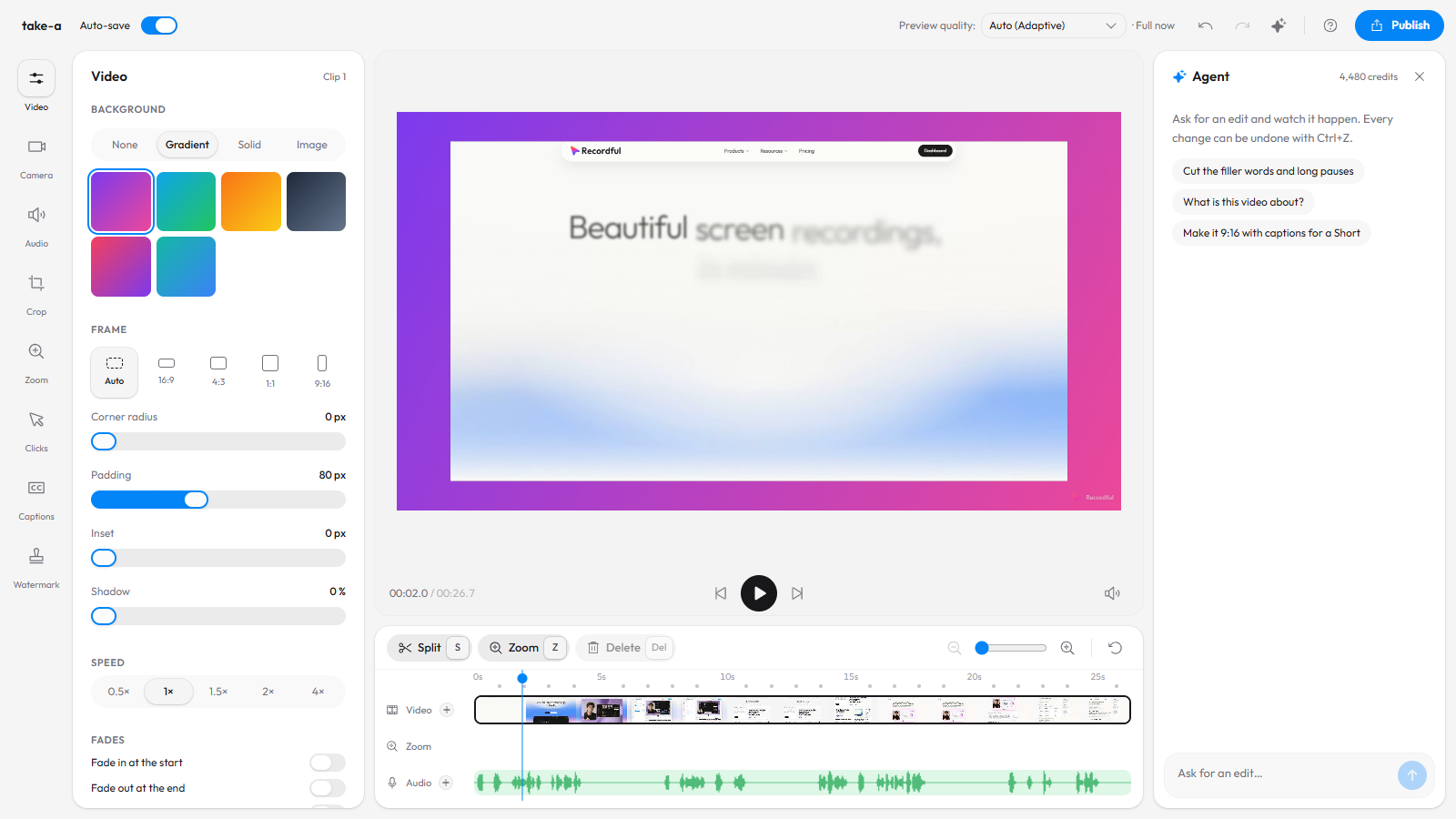
Step 3: Ask for the cleanup
Type a request in plain words:
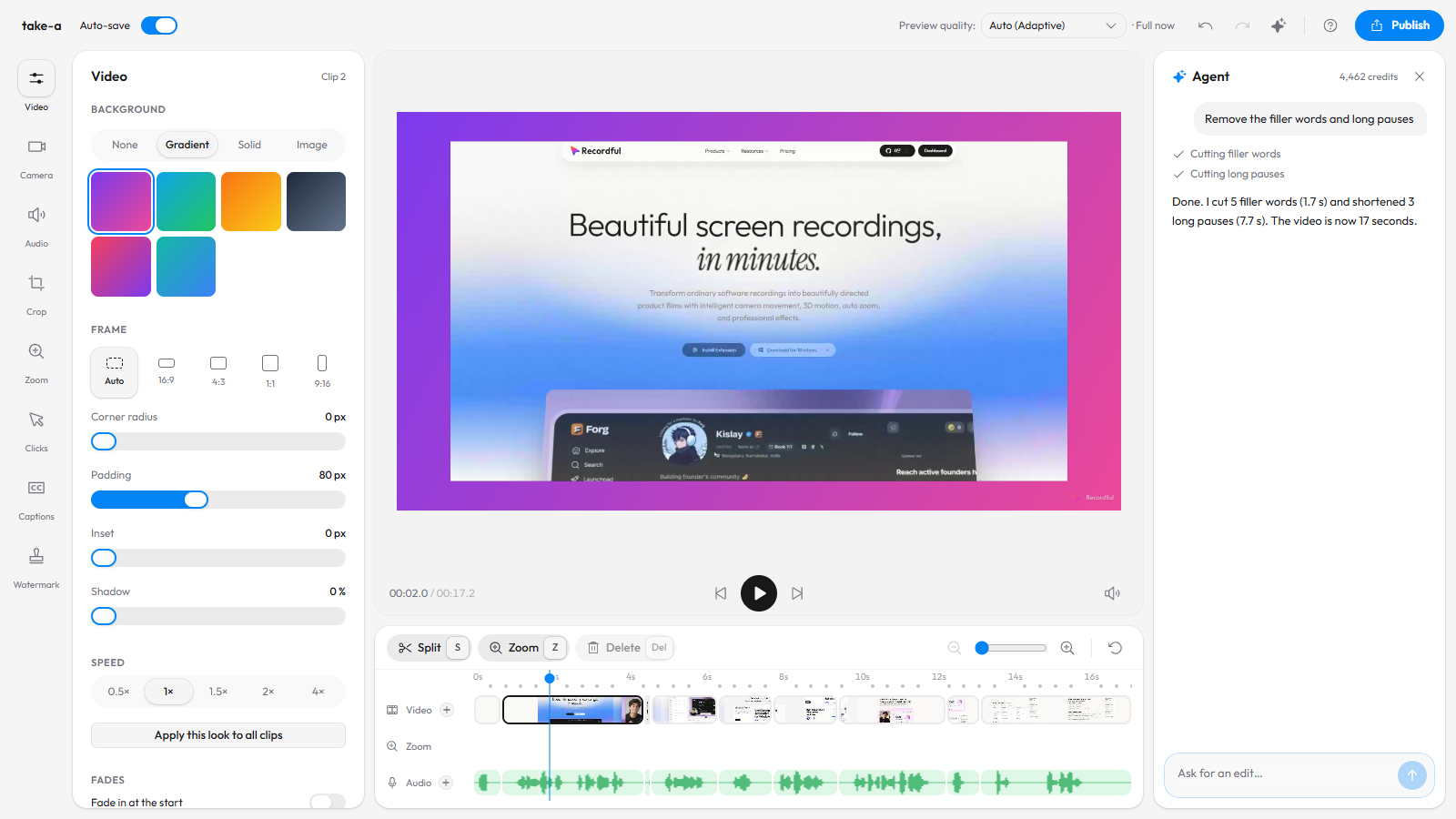
Remove the filler words and long pauses
The Agent turns on the same Filler words and Long pauses switches you would use by hand, and tells you what it cut. In this 26-second take it cut 5 filler words (1.7 seconds) and shortened 3 long pauses (7.7 seconds). The video is now 17 seconds, and every cut shows on the timeline.
Step 4: Ask for captions and a vertical frame
You can ask for more than one thing at once:
Add English captions and make it vertical for Shorts
It transcribes the speech, puts the captions on the video, and changes the canvas to 9:16 with padding and rounded corners. The captions sit on their own track, so you can still edit any line.
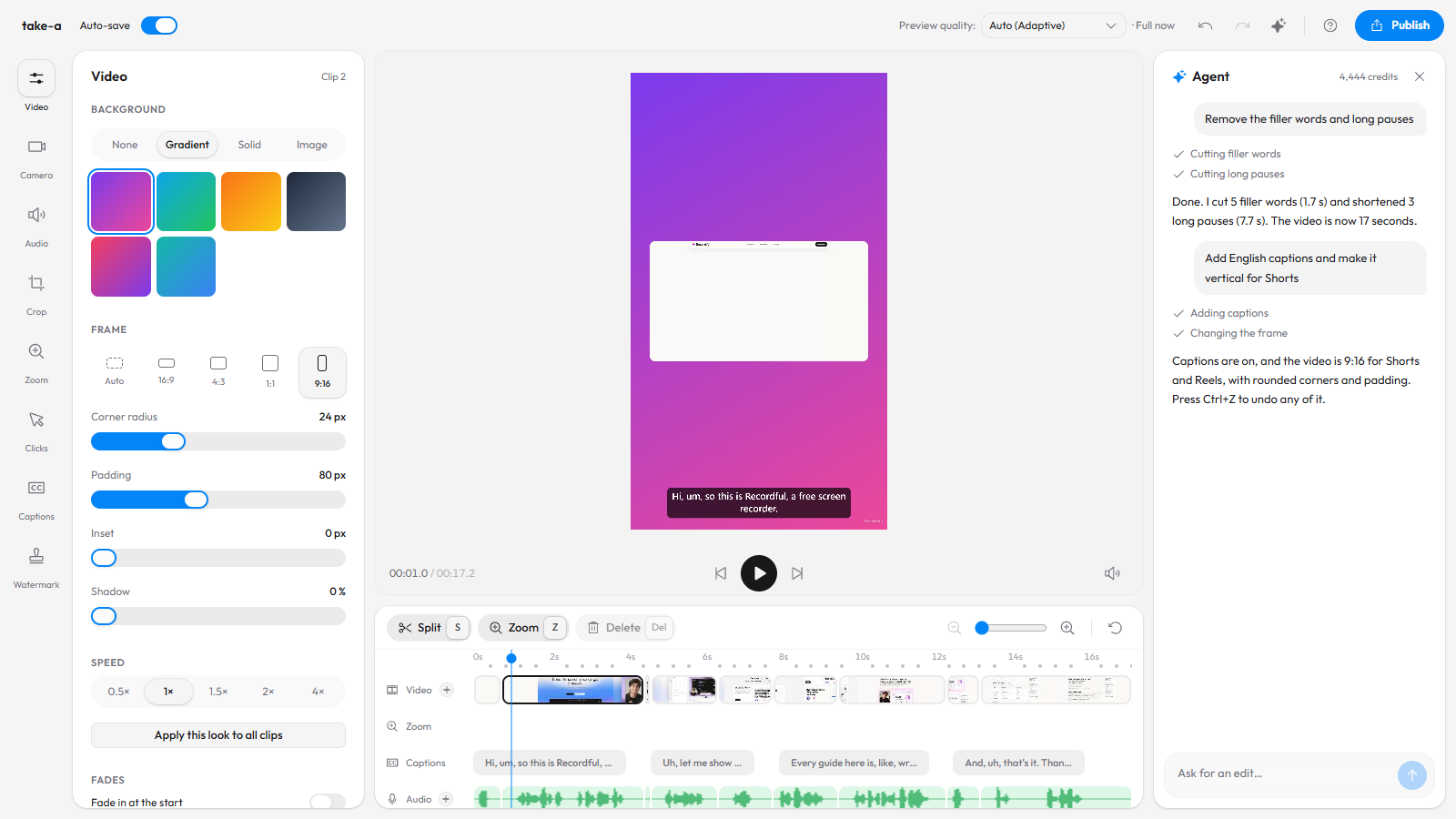
Here is the exported result: 17 seconds instead of 26, vertical, with captions.
The captions keep the words as spoken, "um" included, even though the sound of it is cut. Edit any line in the Captions panel.
Step 5: Undo or adjust anything
Nothing the Agent does is final. Press Ctrl+Z to undo its last change, or open any panel and change the setting yourself. The Agent's edits are ordinary edits on the timeline. While it works, the send button turns into Stop.
Step 6: Export or share
Export an MP4 or WebM up to 4K from Publish → Download locally. On Pro, Publish → Share as link uploads it and gives you a watch page with a transcript.
Prompts that work well
| You want | Ask |
|---|---|
| A tighter take | "Remove the filler words and long pauses" |
| To drop a mistake | "Cut from 0:42 to 0:51" |
| To drop a topic | "Cut the part about pricing" |
| A zoom | "Zoom into the top right corner from 5 to 9 seconds" |
| Captions | "Add captions in Spanish" |
| A clip for Reels | "Make it 9:16 with captions at the top" |
| A summary | "What is this video about? Write three bullet points" |
How much does it cost?
The Agent is part of Recordful Pro, at $19 a month or $108 a year ($9 a month), with a 14-day free trial. Every Pro workspace gets 4,500 AI credits a month, shared by everyone in it. A typical request uses around 10 credits. The Agent shows how many you have left and when they renew.
Recording, the editor and exporting stay free, with no account.
AI editor or a person with a timeline?
Use the Agent for the repetitive parts: cleanup, captions, framing and cutting by topic. Do the taste calls by hand: which zoom feels right, where the music swells. The two mix freely, since the Agent and you edit the same timeline.
Frequently asked questions
Is there an AI that edits screen recordings for you? Yes. Recordful's Agent edits a screen recording from plain-language requests, in the browser editor at recordful.app. It cuts filler words and pauses, cuts sections, adds zooms and captions and changes the frame.
Can AI remove filler words from a video? Yes. Ask the Agent to remove filler words, or turn on Filler words under Audio → Clean up. Every um, uh and empty "like" is cut along with the silence around it.
Can I undo what the AI did? Yes. Every change can be undone with Ctrl+Z, and you can turn any switch back off.
Does it work with videos not made in Recordful? Yes. Open recordful.app/editor and drop in an MP4, WebM or MOV file.
Does it upload my video? No. The Agent sends your requests, and the transcript when it needs it, to the AI model that plans the edits; the edits themselves run in your editor. To find filler words and make captions, the editor sends a compressed copy of the sound to be transcribed, and nothing is kept.
Is the Agent in the desktop app? Not yet. It runs in the web editor at recordful.app. The desktop app's editor gets it later.
See Recordful Agents for the agent and the MCP server that lets Claude Code, Cursor and Codex record demos, and the Recordful Editor for everything you can do by hand.