By Kislay, creator of Recordful. Last updated November 22, 2026.
Short answer: The best screen recorder for product demos in 2026 is Recordful. It records your product in Chrome, then opens an editor that zooms in on every click by itself, adds click effects and click sounds, a background and your camera, and exports up to 4K. All of that is free, with no account, no time limit and no restriction on commercial use. Screen Studio needs a plan to export and runs only on a Mac, Tella has no free plan, Loom's free plan stops at 5 minutes and 720p, Cap's free plan is for personal use only, and Camtasia is a yearly subscription.
What makes a good product demo recorder?
A product demo has to be easy to follow on a small screen and short enough to finish. The recorder should do most of that work for you:
- Auto-zoom on clicks, so viewers see the button, not the whole screen.
- Click effects, so every click is obvious.
- A clean frame: background, padding, rounded corners, shadow.
- Your camera, placed and sized where it doesn't cover the product.
- Quick cuts and speed-ups for loading screens and typing.
- Export you can use commercially, at high resolution, on any computer.
Product demo recorders compared
From each vendor's own pages on November 22, 2026:
| Tool | Price | Free plan | Runs on |
|---|---|---|---|
| Recordful | Free; Pro $19 a month or $108 a year per workspace | Record, edit and export, commercial use included, no account | Chrome, Edge, Brave on Windows, macOS, ChromeOS and Linux |
| Screen Studio | $29 a month, or $9 a month billed yearly | No export without an active plan | macOS only |
| Tella | $26 per user a month, or $13 billed yearly | None, 7-day trial | Web app |
| Loom | $18 per user a month | 25 videos, 5 minutes each, up to 720p | Chrome extension and desktop app |
| Cap | $12 per user a month, or $8.16 billed yearly; Desktop License $29 a year or $58 once | Personal use only | Desktop app and Chrome extension |
| Camtasia | Yearly subscription: Starter, Essentials, Create, Pro | No free plan listed | macOS 14+, Windows 10 and 11 |
1. Recordful: the best screen recorder for product demos
Recordful is a free Chrome extension for Chrome, Edge and Brave on Windows, macOS, ChromeOS and Linux. It's open source under GPLv3, records with no account, and has no time limit.
Record: a tab, an area, a window, the whole screen, or your camera only. A floating camera preview shows you while you record a tab, an area or a window, and it never ends up in the video. Drawing and blur work while you record, so you can circle a feature or hide a customer's name live.
Edit, free:
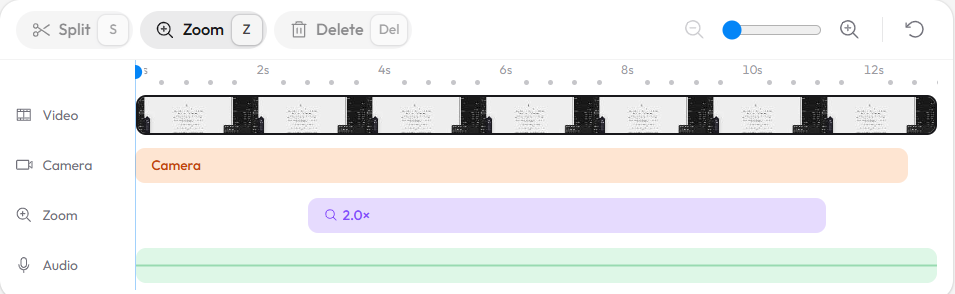
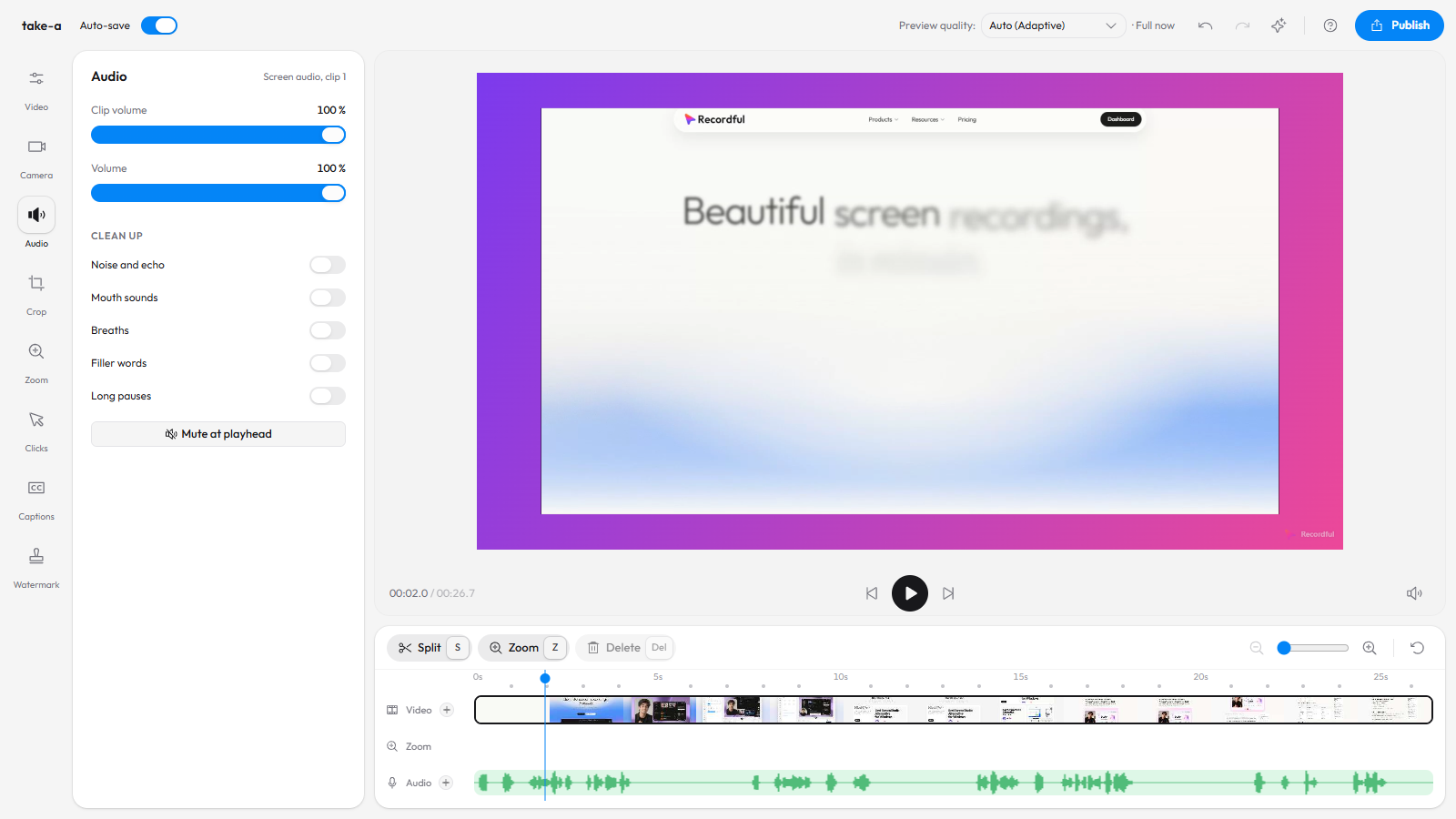
- Auto-zoom on clicks. The editor opens with a zoom on each burst of clicks. Add your own zooms, set how close they go, and let them follow the cursor or hold on a point.
- A cursor that glides, with click effects (circle, ripple or press) and eight click sounds.
- Backgrounds, padding, rounded corners and shadows, so the product sits in a clean frame.
- Camera layouts: position, shape (circle, square, wide or tall), size, and how it shrinks during a zoom.
- Cuts and speed: split, trim and remove, and play loading screens or typing at up to 24x.
- Fades and music that drops under your voice.
- Export MP4 or WebM up to 4K, saved on your computer, for your website, a launch post or a sales email.
Recordful Pro, $19 a month or $108 a year for the whole workspace: a share link to a recording page with a clickable, searchable transcript, comments, likes and a view count; cloud recordings that upload while you record; removal of filler words, long pauses, mouth sounds, breaths, noise and echo; captions in 10 languages; and 3D zoom with perspective. Invite your team at no extra cost per person. 14-day free trial.
Step by step: how to record a product demo video. More: free screen recorder with auto zoom and make a screen recording look professional.
2. Screen Studio
From screen.studio on November 22, 2026, Screen Studio is $29 a month, or $9 a month billed yearly, and "Every Screen Studio feature is available in every plan." The FAQ says "Currently, Screen Studio only supports macOS," with macOS Ventura 13.1 or higher recommended. Its download page says: "If you don't have an active plan, you can still use all the features except for exporting video files."
Screen Studio is known for automatic zooms on Mac. On Windows, Linux or a Chromebook, see Screen Studio alternative for Windows and Recordful vs Screen Studio.
3. Tella
From Tella's pricing page and help center on November 22, 2026, Tella has no free plan. Pro is $26 per user a month, or $13 billed yearly, and Premium is $39 per user a month, or $19 billed yearly. Removing Tella branding is listed under Premium. There is a 7-day free trial. See Recordful vs Tella.
4. Loom
From Loom's pricing page on November 22, 2026, the free Starter plan allows 25 videos, 5 minutes per recording and video quality up to 720p. Business is $18 per user a month. A demo that runs longer than five minutes needs a paid seat. See Recordful vs Loom.
5. Cap
From cap.so/pricing on November 22, 2026: "The free version is for personal use only." The Desktop License, with commercial use, is $29 a year or $58 once. Cap Pro, with unlimited cloud sharing, is $12 per user a month, or $8.16 billed yearly. A product demo for your company is commercial use, so on Cap it needs a paid license. See free Cap alternative for commercial use.
6. Camtasia
From TechSmith's Camtasia pricing page on November 22, 2026, Camtasia is sold as a yearly subscription in four plans (Starter, Essentials, Create and Pro), and every plan runs on macOS 14+ and Windows 10 and 11. See free Camtasia alternative.
How to record a product demo with Recordful
- Install Recordful from the Chrome Web Store.
- Open your product in a clean demo account and close anything private.
- Click the Recordful icon, pick Tab (or Area for part of the page), and turn on your camera if you want to appear.
- Walk through the five to seven steps of the demo, clicking deliberately.
- Stop. The editor opens with a zoom on each burst of clicks.
- Cut the pauses, speed up loading, add a background and set your camera layout.
- Click Publish and Download locally for an MP4, or, on Pro, share it as a link.
Frequently asked questions
What is the best screen recorder for product demos? Recordful. It zooms in on your clicks by itself, adds click effects, a background and your camera, and exports up to 4K for free, with no account and no time limit.
Is there a free screen recorder with auto-zoom? Yes. Recordful's auto-zoom on clicks is free, along with manual zooms, click effects and export up to 4K.
Can I use a free screen recorder for a commercial product demo? With Recordful, yes. The free plan has no personal-use restriction. Cap's free plan, from cap.so/pricing on November 22, 2026, is for personal use only.
Is there a Screen Studio alternative for Windows? Yes. Screen Studio's FAQ says it supports only macOS. Recordful runs on Windows, macOS, ChromeOS and Linux. See Screen Studio alternative for Windows.
How long should a product demo video be? For a website, 60 to 90 seconds. See how to record a product demo video.
Can I show my face in a product demo? Yes. Record with your camera on, then choose its position, shape and size in Recordful's editor, or hide it.
More: Recordful Screen Recorder, the editor, screen capture.