By Kislay, creator of Recordful. Last updated November 24, 2026.
Short answer: The best free screen recorder for a Chromebook is Recordful, a Chrome extension that records a tab, an area, a window, the whole screen or your camera with no time limit and no account, then opens an editor with auto-zoom on clicks and exports MP4 up to 4K. For a quick clip with nothing to install, ChromeOS has Screen capture built in (Shift + Ctrl + Show windows). Screencastify, Loom and ScreenPal also run on Chromebooks, with free plans capped at 30, 5 and 15 minutes per recording.
I built Recordful. Every fact about the other tools below comes from that tool's own website, checked on November 24, 2026.
Which screen recorders work on a Chromebook?
A Chromebook can't install Windows or Mac apps, so a screen recorder there is either built into ChromeOS or runs in Chrome. Here are the five worth knowing:
| Recordful | ChromeOS Screen capture | Screencastify Free | Loom Starter | ScreenPal Free | |
|---|---|---|---|---|---|
| Price | Free | Free, built in | $0 | Free | Free |
| Account needed | No | No | Yes | Yes | Yes |
| Length per recording | No limit | Not stated | 30 minutes | 5 minutes | 15 minutes |
| Number of videos | No limit | No limit | 10 | 25 per person | 10 hosted videos |
| Quality | Export up to 4K | Not stated | Up to 1080p | Up to 720p | 720p playback |
Sources: Google's Chromebook Help, screencastify.com/pricing, loom.com/pricing and screenpal.com/plans, all on November 24, 2026. Recordful's limits are its own.
1. Recordful: the best free screen recorder for Chromebook
Recordful is a free Chrome extension, and ChromeOS is one of its supported systems (Chrome 110 or newer). It records and edits right on your Chromebook. Nothing is uploaded unless you choose to share a link.
What you can record:
- One Chrome tab, so notifications and other windows stay out of the video
- An area of the page
- A window or the whole screen
- Just your camera
Add your microphone and camera to any of them. There's no time limit and no cap on how many videos you make.
What you can do after you stop: the editor opens in Chrome with your recording.
- Trim and cut the mistakes.
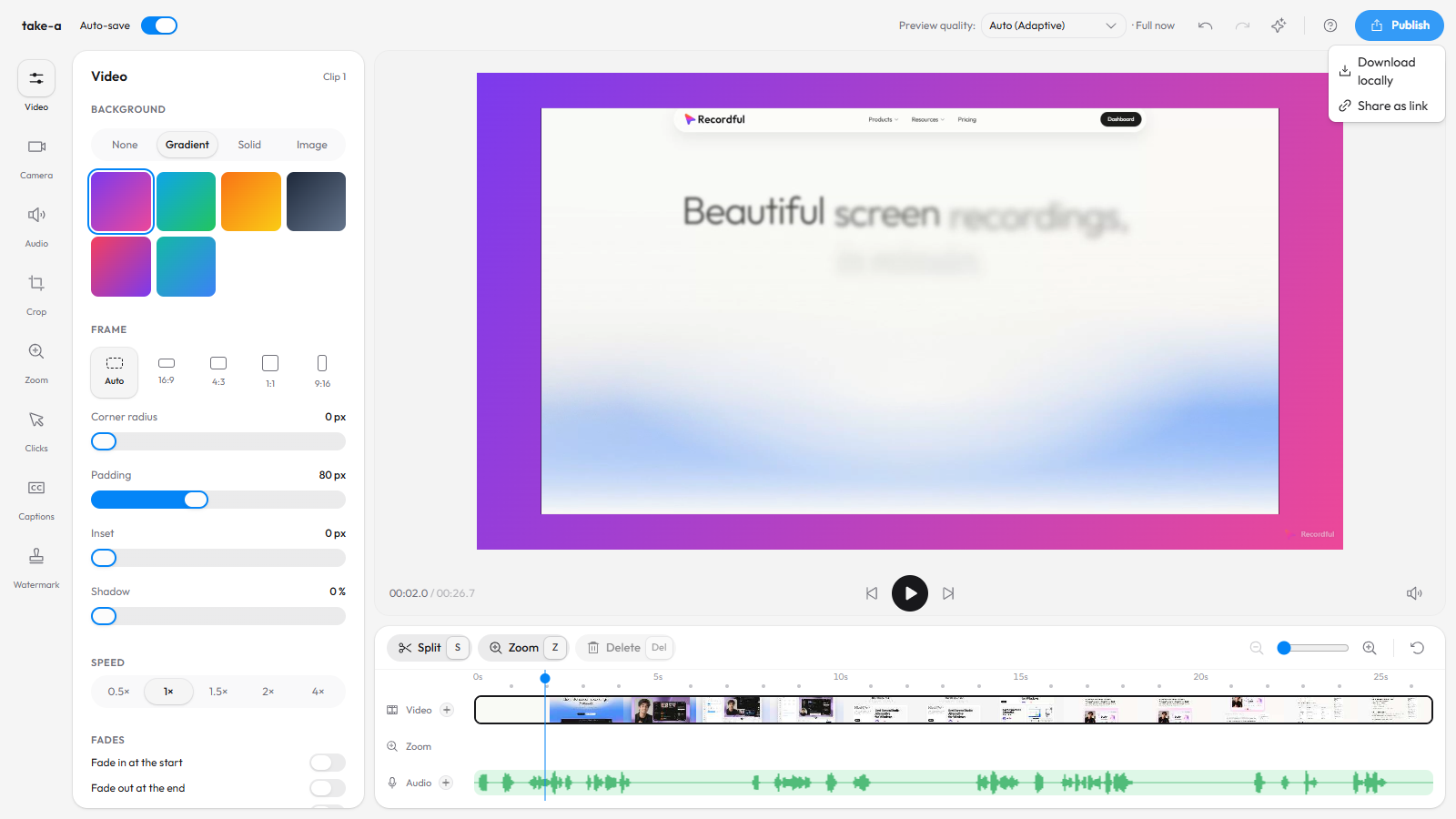
- Auto-zoom on clicks: the video zooms in where you clicked, so small text is readable on a phone or a projector. Add your own zooms or remove any.
- Backgrounds and padding with rounded corners and a shadow.
- Camera layouts: move, resize and reshape your webcam.
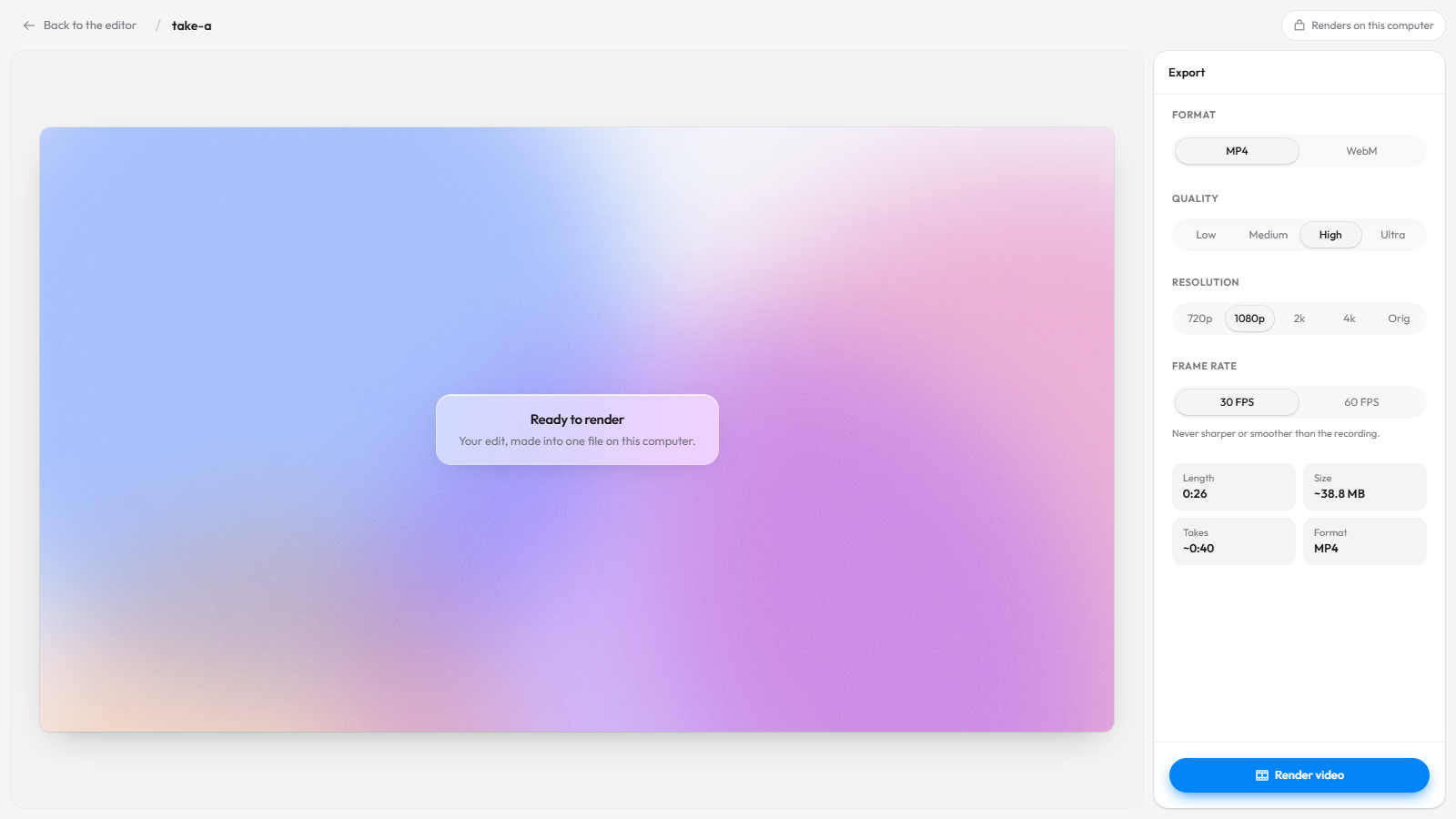
- Export as MP4 or WebM, up to 4K, made on your Chromebook.
A small Recordful mark is on new recordings. You can turn off the Recordful mark for free in the editor.
Recordful Pro adds share links: a watch page with a clickable transcript and captions in 10 languages, and Instant Mode, which uploads while you record and copies the link when you stop. Pro is $19 a month, or $108 a year ($9 a month), with a 14-day free trial, and one price covers your whole workspace. See how to share a screen recording with a link.
2. ChromeOS Screen capture
Every Chromebook has a screen recorder built in. From Google's Chromebook Help page "Take a screenshot or record your screen" on November 24, 2026:
- Start with Shift + Ctrl + Show windows, then pick Screen record. Stop with Search + Shift + X.
- Record the full screen, a partial screen or a window.
- In Settings, turn on Front Camera, choose device audio, microphone or both, and turn on Show clicks and keys.
- Videos are saved to Downloads as .webm files. A partial screen can also be recorded as a .gif, without audio or camera.
It's the fastest way to grab a clip. When you want to cut it, zoom in on clicks or hand in an MP4, record with Recordful instead. The step-by-step guide is in how to screen record on a Chromebook.
3. Screencastify
Screencastify is a Chrome extension used in many schools. From screencastify.com/pricing on November 24, 2026:
| Plan | Billed yearly | Billed monthly | Limits |
|---|---|---|---|
| Free | $0 | $0 | 10 videos, 30 minutes per video, up to 1080p, "Has Castify watermark" |
| Starter | $7 per user a month | $18 per user a month | Unlimited videos, 60 minutes per video, up to 1080p |
| Pro | $10 per user a month | $24 per user a month | Unlimited videos, 180 minutes per video, up to 4K |
| Enterprise & EDU | Custom | Custom | Custom |
Free users get 5 extra videos for each person they invite, up to 20 in total. On Recordful, recording, editing and 4K export are free with no video count at all. Full details in Recordful vs Screencastify.
4. Loom
Loom records in Chrome through its extension. Its desktop app doesn't help on a Chromebook: Loom's help page "The Loom recording platforms" lists it as "Not compatible with Linux or Chromebook OS (Available on Mac and Windows only)."
From loom.com/pricing on November 24, 2026, the free Starter plan allows 25 videos per person, screen recordings up to 5 minutes and quality up to 720p. Business is $18 per user a month. See Loom alternative for Chromebook.
5. ScreenPal
ScreenPal lists Chromebook among its supported devices in the FAQ on screenpal.com/plans. From the same page on November 24, 2026, the free plan has a "15 minute recording limit", 10 hosted videos, 5 video quizzes and 720p playback quality. More in ScreenPal alternative.
How do I pick a screen recorder for my Chromebook?
| You want to | Use |
|---|---|
| Record longer than 30 minutes for free | Recordful |
| Record without an account | Recordful or Screen capture |
| Record one Chrome tab only | Recordful |
| Zoom in on clicks automatically | Recordful |
| Export an MP4, up to 4K | Recordful |
| One price for the whole team | Recordful Pro |
How to record your Chromebook screen with Recordful
- Open the Recordful page on the Chrome Web Store and click Add to Chrome.
- Pin Recordful from the puzzle icon next to the address bar.
- Click the Recordful icon and pick Tab, Area, Window, Screen or camera only.
- Turn on your microphone and camera if you want them, then record.
- Stop. The editor opens with your recording.
- Trim it, check the zooms, then click Publish → Download locally for an MP4 saved on your Chromebook.
Frequently asked questions
What is the best free screen recorder for Chromebook? Recordful. It's a free Chrome extension with no time limit, no video cap and no account, a built-in editor with auto-zoom on clicks, and MP4 export up to 4K.
Does a Chromebook have a built-in screen recorder? Yes. Press Shift + Ctrl + Show windows and select Screen record. Recordings are saved to Downloads as .webm files.
Can I screen record on a Chromebook for free without a time limit? Yes, with Recordful. Recordings saved on your Chromebook have no time limit. Keep at least 1 GB of free storage before a long recording.
How do I get an MP4 from my Chromebook recording? Record with Recordful and choose MP4 when you export, up to 4K.
Does Recordful need an account on a Chromebook? No. Recording, editing and exporting in the Chrome extension need no account.
Does Recordful work on a school Chromebook? It needs Chrome 110 or newer and permission to install extensions. If your school blocks extensions, ask your admin to allow Recordful.
Is Recordful open source? Yes. The extension is open source under GPLv3, on GitHub.
Best screen recorders for other systems: Mac, Windows and Linux. For Chromebook users: Screen Studio alternative for Chromebook.
See Recordful Screen Recorder and the editor.