By Kislay, creator of Recordful. Last updated November 19, 2026.
Short answer: The best free screenshot tool in 2026 is Recordful. In Chrome it takes an area, a single element, the visible page, the full scrolling page or any screen or window, then opens an editor with backgrounds, window frames, 3D tilt, arrows, text, numbered steps, blur and one-click hiding of emails, card numbers and keys. Downloads have no watermark, in PNG, JPEG or WebP at up to 3x, with no account. ShareX and Greenshot are free and open source for Windows, and Windows and macOS have screenshot tools built in. Snagit is a yearly subscription and CleanShot X is Mac only.
What should a free screenshot tool do?
- Capture an area, a window and the whole screen.
- Capture a full web page, scrolled and stitched into one picture.
- Mark it up: arrows, boxes, text, steps.
- Hide private details before you share.
- Make it look good for a doc, a tweet or a slide.
- Export without a watermark, and without an account.
Screenshot tools compared
From each vendor's own pages on November 19, 2026:
| Tool | Price | Runs on | Full-page capture of a website |
|---|---|---|---|
| Recordful | Free, no account | Chrome, Edge and Brave on Windows, macOS, ChromeOS and Linux | Yes, scrolled and stitched |
| ShareX | Free, open source | Windows | Scrolling capture |
| Greenshot | Free, open source | Windows | Internet Explorer pages |
| Snipping Tool | Built in | Windows | Not listed |
| Screenshot app | Built in | macOS | Not listed |
| Snagit | Yearly subscription, per user | Windows and macOS | Scrolling capture |
| CleanShot X | $35 once, $19 a year for updates after year one | macOS only | Scrolling capture |
1. Recordful: the best free screenshot tool
Recordful is a free Chrome extension for Chrome, Edge and Brave on Windows, macOS, ChromeOS and Linux. It's open source under GPLv3 and needs no account.
Four ways to capture:
- Area: drag a box, or click an element to take just that element.
- Visible page: what you can see right now.
- Full page: the page is scrolled and stitched. A sticky header or cookie banner appears once instead of repeating, and pictures that load as you scroll are loaded first.
- Screen or window: any screen or app window on your computer.
Each mode can have its own keyboard shortcut in Chrome's extension shortcuts. Screenshots of web pages are drawn from the page itself, so text and code stay sharp at any zoom.
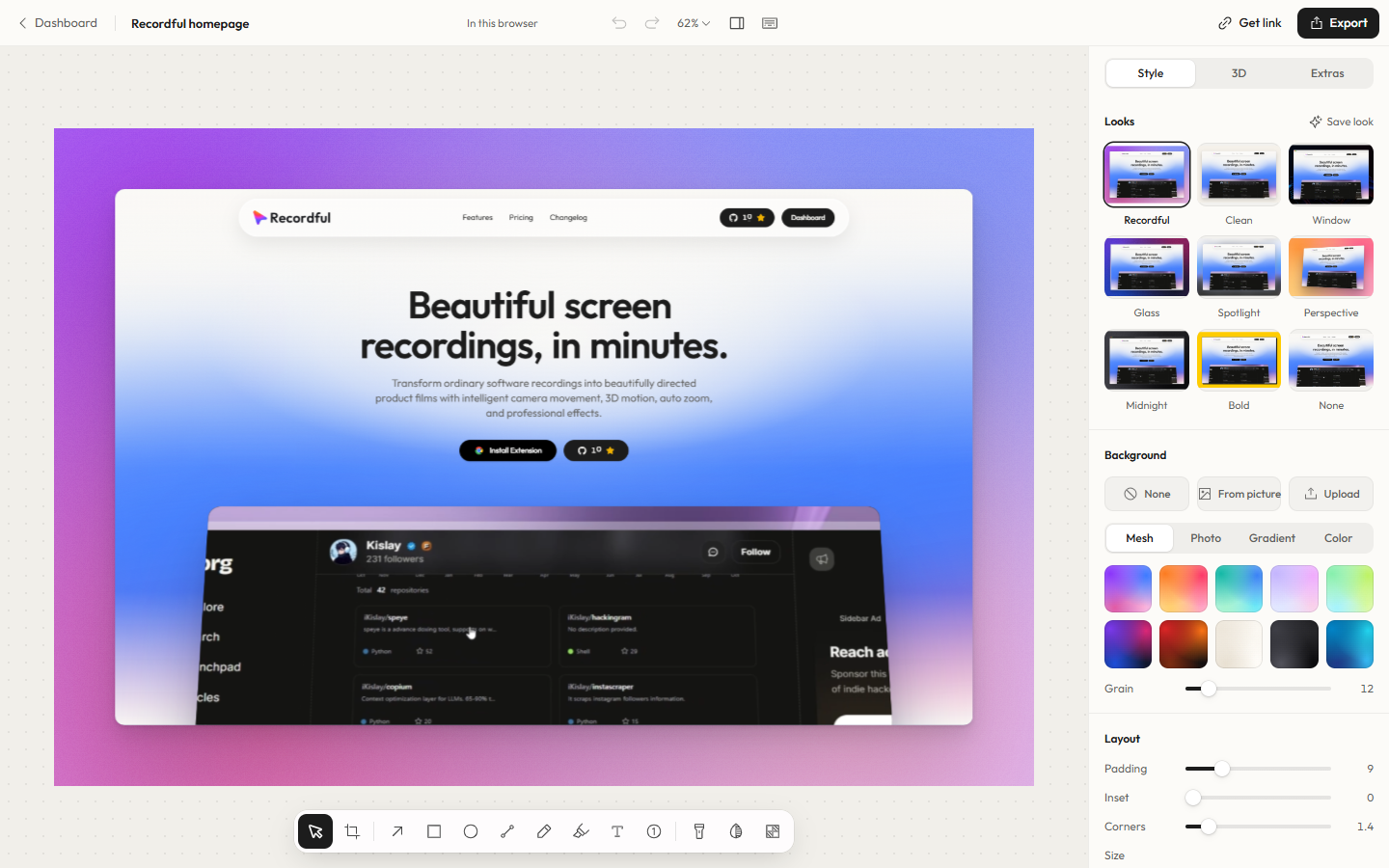
A free editor:
- Looks: mesh, photo, gradient or colour backgrounds, padding, rounded corners, window frames, shadows and borders, plus sizes for X, Instagram, LinkedIn and stories.
- 3D: tilt, turn and skew the picture in real perspective.
- Mark up: arrows that bend, rectangles, ellipses, lines, a pen, a highlighter, text, numbered steps, a spotlight, blur and pixelate. Crop, rotate and flip.
- Private by default: Recordful finds emails, phone and card numbers, keys and tokens in the screenshot and offers to hide them all in one click. Blur and pixelate throw the detail away.
- Copy the words on a captured page as text, exactly as written.
Export: download or copy in PNG, JPEG or WebP at up to 3x, with no watermark, or share straight to X or Threads. With Recordful Pro a screenshot also gets a link, comments and likes.
Recordful is a screen recorder too, so the same extension records a tab, an area, a window or the screen with no time limit.
More: free Snagit alternative with full-page screenshots.
2. ShareX
From getsharex.com on November 19, 2026, ShareX is "a free and open source screenshot tool for Windows." Its feature list includes scrolling capture, screen recording and GIF recording, and text recognition (OCR) as an after-capture task. ShareX runs on Windows.
3. Greenshot
From getgreenshot.org on November 19, 2026, Greenshot is "a light-weight screenshot software tool for Windows" and "completely free and open source." It captures a selected region, a window or the full screen, and can "capture complete (scrolling) web pages from Internet Explorer."
4. Snipping Tool (Windows)
From Microsoft's support page on November 19, 2026, the Snipping Tool is built into Windows. Win + Shift + S opens it, with Rectangle, Window, Full screen and Freeform modes, and PrtSc copies the whole screen. Snips are saved to the Screenshots folder.
5. The Screenshot app (macOS)
From Apple's support pages on November 19, 2026: Shift-Command-3 captures the entire screen, Shift-Command-4 a selected area (press Space for a window or menu), and Shift-Command-5 opens the Screenshot app with a timer and save options. Screenshots save to the desktop by default.
For a full web page on a Mac, Recordful's extension scrolls and stitches it in Chrome.
6. Snagit (paid)
From TechSmith's pages on November 19, 2026, Snagit runs on Windows and macOS and is sold as a subscription, priced per user per year and billed yearly. It also records your screen, microphone, system audio and webcam.
If you want a free option without a yearly renewal, see the free Snagit alternative.
7. CleanShot X (paid, Mac only)
From cleanshot.com/pricing on November 19, 2026, CleanShot Basic is $35 one-time, with an optional renewal at $19 a year for updates after the first year. CleanShot Pro is $10 per user a month billed yearly. The FAQ says: "There's no Windows version and at the moment there are no plans on releasing one."
On Windows, Linux or a Chromebook, see CleanShot X alternative for Windows.
How to take a full-page screenshot for free with Recordful
- Install Recordful from the Chrome Web Store.
- Open the page you want to capture.
- Click the Recordful icon and open the Screenshot tab.
- Choose Full page. Recordful scrolls the page and stitches it together.
- In the editor, pick a look, add arrows or steps, and hide anything private in one click.
- Download a PNG, JPEG or WebP, or copy it to paste anywhere.
Frequently asked questions
What is the best free screenshot tool? Recordful. It captures an area, an element, the visible page, the full page or any screen or window, and its free editor adds backgrounds, 3D tilt, arrows, text, steps and one-click redaction, with no watermark and no account.
How do I take a full-page screenshot for free? Install the Recordful Chrome extension, open the page, choose Full page in the Screenshot tab, and it scrolls and stitches the whole page into one picture.
Is there a free alternative to Snagit? Yes. Recordful takes full-page, area, page and screen screenshots and edits them for free. See free Snagit alternative.
Is there a CleanShot X for Windows? CleanShot's FAQ says there is no Windows version. Recordful runs on Windows, Linux, ChromeOS and macOS. See CleanShot X alternative for Windows.
Do Recordful screenshots have a watermark? No. Downloads have no watermark.
Can I hide email addresses and passwords in a screenshot? Yes. Recordful finds emails, phone and card numbers, keys and tokens and offers to hide them all in one click, and blur and pixelate can't be undone by the viewer.
Does Recordful screenshot work on a Chromebook? Yes. It's a Chrome extension, so it works on ChromeOS.